Saturday, August 8, 2015


Computer based presentation tools


Computer based presentation technology is used to communicate more effectively with students in teaching learning process.


Presentation tools
ΓΌ                      

Microsoft PowerPoint
Corel Presentation
Macromedia Director
Adobe Acrobat
Author ware 


Sunday, May 24, 2015

Selection of instructional
 Strategies, characteristics, Strengths and weaknesses.


  Shared learning (collaborative learning)

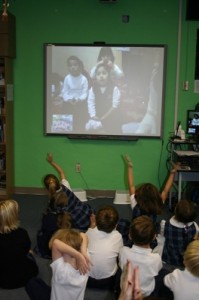
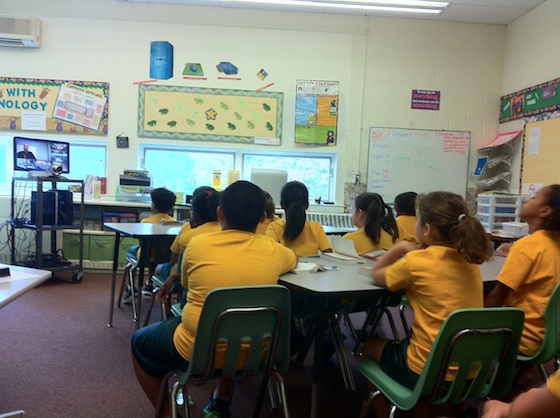
Video conferencing 
  1.          Introduction
  • A video conference is a live connection between people in separate locations for the purpose of communication, usually involving audio and often text as well as video.
  •  At its simplest, video conferencing provides transmission of static images and text between two locations. 
  •  At its most sophisticated, it provides transmission of full-motion video images and high-quality audio between multiple locations.

Application

  • Narration/Description (Lecture) 
  • Guided Discussion 
  • Brainstorming 
  • Case Study 
  • Role Playing 
  • Panel Discussion 
  • Demonstration Drill and Practice 

  1. Benefits, Advantages and Disadvantages on Applying in Learning - Teaching process
  • Find opportunities for students to talk to experts, 
  • Hear interesting people, 
  • Learn about distant places, 
  • Meet up with students to share cultural information or work on projects together.
  1. Practical Problems 
  • Language problems 
  • Telecommunication problems
  • The level of the Students
Solutions :-

  • Train Students  to use English (As a second language)
  • Facilitate various Translation methods  
  • Using new Technology 


References:-
1. http://plpnetwork.com/2012/09/13/video-conferencing-classroom/
2. http://www.usdla.org/v/assets/pdf_files/AIMSGDL%202nd%20Ed._styled_010311.pdf

Selection of instructional Strategies, characteristics, Strengths and weaknesses

Selection of instructional
 Strategies, characteristics, Strengths and weaknesses.


  Shared learning (collaborative learning)

Video conferencing 
  1.          Introduction
  • A video conference is a live connection between people in separate locations for the purpose of communication, usually involving audio and often text as well as video.
  •  At its simplest, video conferencing provides transmission of static images and text between two locations. 
  •  At its most sophisticated, it provides transmission of full-motion video images and high-quality audio between multiple locations.

Application

  • Narration/Description (Lecture) 
  • Guided Discussion 
  • Brainstorming 
  • Case Study 
  • Role Playing 
  • Panel Discussion 
  • Demonstration Drill and Practice 

  1. Benefits, Advantages and Disadvantages on Applying in Learning - Teaching process
  • Find opportunities for students to talk to experts, 
  • Hear interesting people, 
  • Learn about distant places, 
  • Meet up with students to share cultural information or work on projects together.
  1. Practical Problems 
  • Language problems 
  • Telecommunication problems
  • The level of the Students
Solutions :-

  • Train Students  to use English (As a second language)
  • Facilitate various Translation methods  
  • Using new Technology 


References:-
1. http://plpnetwork.com/2012/09/13/video-conferencing-classroom/
2. http://www.usdla.org/v/assets/pdf_files/AIMSGDL%202nd%20Ed._styled_010311.pdf

Saturday, May 23, 2015

ICT Applications available in 

Learning Teaching process of Schools

Advantages

  • Teachers can easily teach various subjects using ICT Applications.
  • Student easily grasp difficult subject areas.
  • It serves time of both Teachers & Students .
  • Self Learning materials are available.
  • Many pupils consider ICT Applications are very helpful  to do assignments.

Disadvantages
  • Learners abuse to search directly the Target and  don't read other articles referring to Target.
  • Some web sites supply wrong details.
  • Lost of live communication with people around them.
Image result for ict
Problems
  • Lack of  ICT Facilities.
  • Time allocating problems according to School Time Table . 
  • Lack of Teachers' devotion in preparing Learning Teaching materials
  • Lack of fundamental knowledge of using ICT tools for both Teachers & Students.     
Solutions
  • Establishing well quipped computer learning centres at schools.
  • Organize Teacher attitude-development programs.
  • Organize basic Training   programs in  using ICT tools for both Teachers & Students.     Image result for ict
 Future Trends
Image result for ict
  • Distant education in rich environment.
  • persuades Learners to Gain knowledge by Established  free WiFi zones .
  • Overpaid Job opportunities .